How to Use Pinterest to Drive Free, Long-Lasting Traffic to Your Link-in-Bio

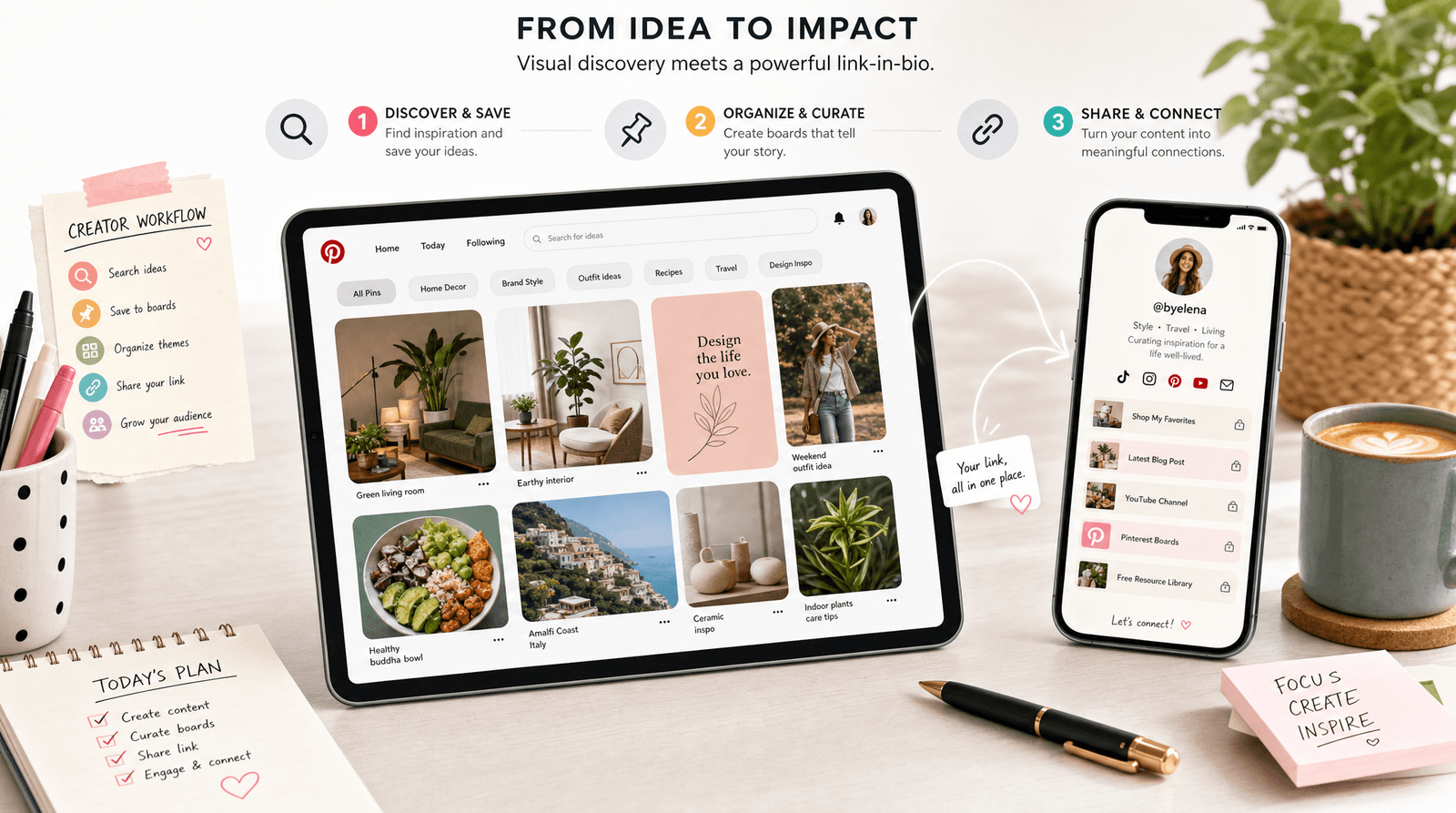
Quick gut check: when was the last time you thought about Pinterest as a serious traffic source? If your answer is "never" or "back when I was planning my kitchen renovation," you're in the majority. Most creators and small business owners treat Pinterest like a digital scrapbook rather than what it actually is.
Here's the reframe that changes everything: Pinterest isn't a social network. It's a visual search engine. People don't go there to scroll mindlessly and forget what they saw. They go there to plan, to search, and to do something. And unlike an Instagram post that's dead within 48 hours, a Pinterest pin can keep driving clicks for months or even years after you publish it.
That long shelf life is the whole point. While everyone else is chasing the next viral Reel, you could be quietly building a library of pins that send free, high-intent traffic to your Liinks page on autopilot. Here's exactly how to set it up.
Why Pinterest Traffic Is Different (And Why It Lasts)
Before the tactics, it helps to understand what makes Pinterest worth your time in the first place.
On most social platforms, content has a brutally short lifespan. A tweet lives for minutes. An Instagram post peaks within a day or two. A TikTok might get a second life weeks later, but that's the exception, not the rule. You're on a treadmill: post constantly or disappear.
Pinterest works on a completely different clock. Because it's search-driven, pins surface whenever someone looks for the topic they cover. A pin you publish today can still be showing up in search results and driving clicks next spring. That means:
- Compounding traffic — your back catalog keeps working while you create new pins
- High intent — people search Pinterest with a goal: a recipe to cook, an outfit to buy, a business to start
- A buying mindset — Pinterest users are often in planning-and-purchasing mode, not killing time
The catch is the same one every platform hands you: Pinterest only lets you point pins at links, and your audience needs one destination that holds everything. That's exactly what a link-in-bio page is for. Just like with LinkedIn, the trick is connecting a high-intent platform to a hub that actually converts.
Step 1: Set Up Your Pinterest Profile for Clicks
Before you pin a single thing, get the foundation right. A sloppy profile leaks traffic at every step.
Switch to a Business Account
It's free and it unlocks the two things you need: analytics and Rich Pins. A business account shows you which pins drive the most outbound clicks, which is the only metric that matters here. Convert in your settings if you haven't already.
Add Your Liinks URL to Your Profile
Pinterest gives you a website field on your profile. Put your Liinks URL there. When someone discovers a great pin and clicks through to see who made it, your profile is the next stop, and your link-in-bio should be one tap away.
Write your bio like a search result, not a diary entry. Lead with what you help people do and who you help: "Easy weeknight dinners for busy parents" beats "Mom, foodie, dreamer." Pinterest indexes this text, so the clearer you are, the more often you surface.
Verify Your Profile and Claim Your Accounts
Verified profiles get a small trust boost and access to deeper analytics. Claim your other accounts where Pinterest allows it so your pins are consistently attributed back to you. This is the unglamorous setup work that pays off every single month afterward.
Step 2: Design Pins People Actually Click
Pinterest is visual first. A weak pin gets ignored no matter how good the destination is. The good news: you don't need to be a designer to make pins that perform.
Go Vertical
Pinterest favors tall images, ideally a 2:3 ratio (1000 x 1500 pixels is the sweet spot). Vertical pins take up more real estate in the feed and consistently outperform square or horizontal ones. Set this as your default canvas size and never think about it again.
Make the Value Obvious in Two Seconds
People scan Pinterest fast. Your pin should communicate its payoff almost instantly. A clear text overlay helps: "5 Link-in-Bio Mistakes to Avoid" or "How I Plan a Month of Content in One Afternoon." The image draws the eye; the text closes the deal.
Stay On-Brand
Use the same fonts, colors, and overall feel across your pins so your content is recognizable as you scroll. This is the same consistency principle that makes a great link-in-bio page work: when your pins and your Liinks page share a visual identity, the click-through feels seamless instead of jarring. If you've already built a cohesive page, borrow those colors and fonts for your pins.
Create Multiple Pins per Destination
Here's a move most people miss: make several different pins that all point to the same link. Different images, different text overlays, different angles. Pinterest treats each as a fresh piece of content, so you multiply your chances of one taking off without creating any new destinations.
Step 3: Optimize Every Pin for Search
This is where Pinterest rewards the people who treat it like the search engine it is. Every pin is a chance to rank for a keyword, so feed the algorithm what it needs.
Write Keyword-Rich Titles and Descriptions
Think about the exact words your audience would type into the search bar, then use them naturally in your pin's title and description. If you run a candle shop, "cozy fall home decor ideas" and "soy candle gift sets" are searches worth targeting. Don't keyword-stuff; just be specific and descriptive.
This is the same discovery muscle that powers good social search optimization. The platforms differ, but the principle is identical: write for how real people search, and let the algorithm connect them to you.
Use Boards as Categories
Organize your pins into clearly named boards that double as keywords: "Small Business Marketing Tips," "Link-in-Bio Inspiration," "Content Planning." Boards give Pinterest context about what your content is about and help your pins surface for the right searches.
Add Hashtags and Tags Sparingly
A few relevant hashtags can help categorize a pin, but they're secondary to your titles, descriptions, and board names. Don't overthink this part. Nail the keywords first.
Step 4: Point Pins at a Link-in-Bio That Converts
You can drive all the Pinterest traffic in the world, but if it lands on a cluttered or generic page, you've wasted the click. Treat your Liinks page as the closing argument for everything your pins promise.
Match the Page to the Pin
If a pin promises "my favorite budget skincare picks," the page it lands on should put those picks front and center, not bury them under a podcast link and a newsletter signup. The closer the page matches the pin's promise, the higher your conversion. When you have very different pin themes, send them to a page that surfaces the most relevant content first.
Put the Highest-Value Links at the Top
Button order matters. Pinterest visitors arrived with a specific intent, so lead with the action that satisfies it: shop the product, grab the free guide, read the full recipe. Don't make them scroll past links meant for a different audience.
Use Sections to Serve Multiple Niches
If you pin across several topics (a common Pinterest strategy), use sections on your Liinks page to keep things organized. A food creator might have "Recipes," "Kitchen Tools I Love," and "Work With Me" as distinct sections. A Pinterest visitor lands and immediately sees the group that matches why they clicked.
Capture the Visitor Before They Leave
Pinterest traffic is high-intent but often first-time. Give them a reason to stick around: a newsletter signup, a free download, a follow. Turning a one-time pin click into a subscriber is how you stop renting your audience and start owning it. (We dug into this in Newsletter Growth on Autopilot.)
Step 5: Track What Works and Do More of It
The whole appeal of Pinterest is that good pins compound. To compound on purpose, you need to know which pins are actually pulling their weight.
Watch Outbound Clicks, Not Just Impressions
Impressions and saves feel nice, but outbound clicks are what move people toward your link-in-bio. In Pinterest Analytics, sort by outbound clicks to find your real winners, then make more pins in that style, on that topic, pointing to that kind of destination.
Tag Your Links With UTMs
Add UTM parameters to the links on your Liinks page so you can see exactly how much traffic and how many conversions Pinterest drives compared to your other channels. The free Liinks UTM Link Builder makes this a 30-second job, and the data tells you whether Pinterest deserves more of your time.
Let Your Liinks Analytics Close the Loop
Pinterest tells you what got clicked on Pinterest. Your Liinks dashboard tells you what happened next: which buttons Pinterest visitors actually tapped once they landed. Put those two numbers together and you have a clear, free feedback loop. Make more of the pins that send traffic that converts, and quietly retire the ones that don't.
TL;DR
Pinterest is a visual search engine that sends free, high-intent traffic with a shelf life measured in months, not hours. Here's the playbook:
- Set up your profile — business account, keyword-rich bio, and your Liinks URL in the website field
- Design clickable pins — vertical 2:3 images, obvious value, on-brand, multiple pins per destination
- Optimize for search — keyword-rich titles, descriptions, and board names so pins surface for real queries
- Send clicks to a page that converts — match the page to the pin, lead with high-value links, use sections
- Track outbound clicks and UTMs — double down on the pins that drive traffic that actually converts
Turn Pinterest Pins Into a Page That Converts
Pinterest will happily send you free traffic for years if you give it a reason to. The piece most people get wrong is the destination: they point all those high-intent clicks at a messy, generic page and wonder why nobody converts.
Liinks gives you customizable sections, clean on-brand design, built-in analytics, and free tools like the UTM builder, so every Pinterest visitor lands somewhere that actually moves them to act. Set up your free page at liinks.co and start turning those evergreen pins into clicks, subscribers, and customers.