How to Order Your Link-in-Bio Buttons (And the Click-Curve Math That Decides What People Actually Tap)

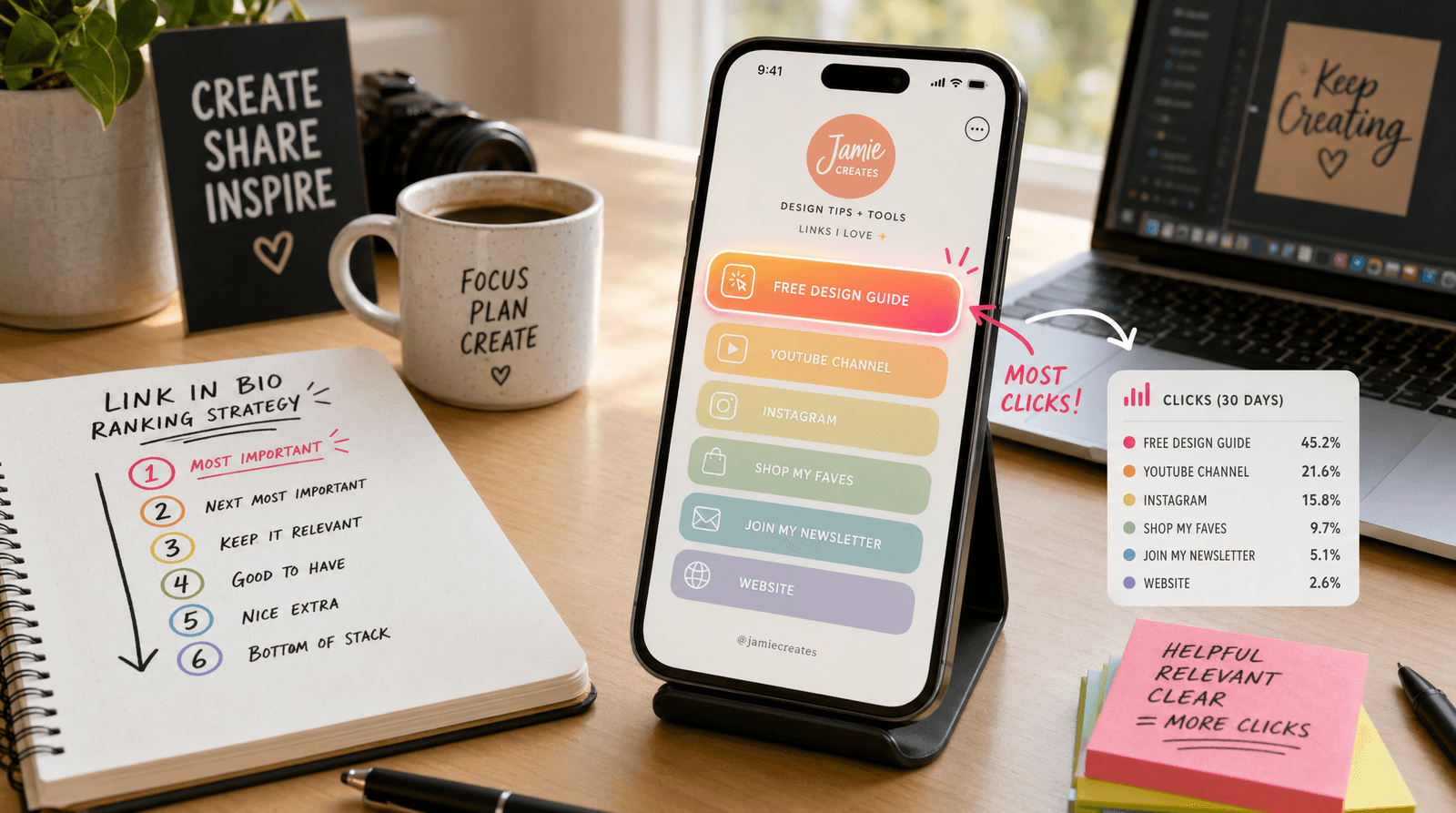
Open your Liinks analytics. Look at the click distribution across your buttons. If your page is like 90% of the ones we see, the chart looks like a cliff: the top button gets the lion's share of taps, the second button gets a respectable but much smaller chunk, the third gets a fraction of that, and everything below the fold gets crumbs.
This isn't a quirk of your audience. It's a near-universal pattern across every link-in-bio page on the internet. People tap what they see first. They tap less of what's below it. And they almost never reach the bottom.
Which means the order of your buttons isn't a cosmetic decision. It's the single highest-leverage optimization you can make to your link-in-bio page — bigger than redesigning your background, bigger than rewriting your bio, bigger than swapping icons. And it takes about ten minutes.
Here's how to do it right.
The Click-Curve Math
First, the underlying pattern. When you look at click distributions across thousands of link-in-bio pages, the same shape shows up over and over again:
- The top button typically captures somewhere between 40-60% of all clicks on the page
- The second button gets roughly 20-30%
- The third button gets 10-15%
- Buttons four through six split the remaining ~10%
- Anything below the fold (button seven and beyond) gets <2% combined
This is what we call the click curve. It decays sharply, then flattens into a long tail. The exact percentages vary by audience and design, but the shape is remarkably consistent.
Two implications follow immediately:
- The single most important decision you'll make is which button goes first. That position is worth roughly 5-10x as much as any other.
- Anything below the fold is essentially decoration. It's there for completeness, not conversion. If you want a link to actually get tapped, it has to be in the top 3-4 slots.
Once you internalize the click curve, button ordering stops being aesthetic and becomes a math problem with a right answer.
Step 1: Define the One Job Your Page Is Doing Right Now
Before you reorder anything, answer this: if a visitor only taps one button on my page today, which button do I want it to be?
Note the wording. Not "which button is most important to my brand long-term." Not "which one represents the biggest revenue line on my P&L." Which one matters right now, this week, this month.
Most creators struggle with this because they're trying to optimize their page for too many goals at once: building their email list, promoting their podcast, selling a product, driving Instagram follows, monetizing affiliate links, and showcasing their portfolio. Pages that try to do everything end up doing nothing.
Pick one primary goal. Examples that work:
- Newsletter growth — the top button drives email signups
- Course launch — the top button is the sales page for the course
- Booking inquiries — the top button opens your contact form or scheduler
- Product sales — the top button leads to your shop's bestseller or current promo
- Latest content — the top button is your newest podcast episode or YouTube video
The goal can change month to month. That's fine. In fact, it should. Treat your top button as a rotating spotlight, not a permanent feature.
Step 2: Apply the Top-Three Rule
Once you've named the one button that matters most, fill out the next two slots strategically. Together, these three buttons will absorb roughly 70-90% of every click your page gets, so this is where almost all your optimization energy should go.
Here's the rule of thumb that consistently works:
- Slot 1 — Primary CTA. The single most important action you want visitors to take. Newsletter, sales page, booking, whatever you decided in Step 1.
- Slot 2 — Secondary CTA or evergreen flagship. Something durable that pays off over time — your podcast, your portfolio, your shop homepage. Think "the thing you'd still want them to find six months from now."
- Slot 3 — Hot/timely content. Latest episode, newest blog post, current promotion. Something that tells visitors you're active and gives them an easy "first taste."
This ordering works because it covers the three jobs every link-in-bio page does simultaneously: capture intent (slot 1), build trust (slot 2), and provide entertainment (slot 3). Skip any of those jobs and the page leaks visitors.
Step 3: Treat Everything Below the Fold as Optional Furniture
Here's a hard truth: the buttons in slots 4 through 10 are not really doing the job you think they are. Their click rates are tiny. They're mostly there to signal completeness — "yes, I have an Instagram, yes, I have an Amazon storefront, yes, I have a Spotify" — not to actually drive traffic.
Two ways to handle this without bloating your page:
1. Group related links into sections or folders. Instead of seven separate buttons for seven affiliate codes, use one section labeled "Tools I use daily" and tuck the affiliates inside. Visitors who care will expand it. Visitors who don't will scroll past faster, which means they're more likely to scroll up and re-tap your top buttons.
2. Move social-platform links into your icon row. Most link-in-bio platforms — including Liinks — let you display Instagram, TikTok, X, YouTube, and other social platforms as small icons across the top of your page rather than as full-width buttons. This gives visitors easy access to your other profiles without burning prime real estate that should be doing harder work.
Once you've done both, your page will go from ten cluttered buttons to maybe four buttons plus a section or two. Visitors will tap more, scroll more, and convert more — counterintuitive but consistently true.
Step 4: Match the Button Copy to the Position
Position decides whether a button gets attention. Copy decides whether that attention turns into a click. Once you've fixed your order, sharpen the labels.
A few rules that consistently lift CTRs:
- Lead with the verb. "Get the free template" outperforms "Free template." "Book a 30-min consult" outperforms "Consultation."
- Be specific about what they're getting. "Listen to Ep. 47: How to Price a Course" outperforms "New podcast." Specificity beats generality almost every time.
- Hint at the cost or commitment. "Subscribe (free, 1 email/week)" outperforms "Subscribe." Visitors who know the deal upfront convert better than visitors who suspect a trick.
- Avoid "click here" and "learn more." They're filler. The button itself is the click — labeling it "click" is redundant. Use the space to describe the destination.
If you want a deep dive on this with real-world examples, our piece on high-converting button copy breaks down exact phrases that lift click rates. And remember the rule we covered in every link is a promise: your button label is a contract with the visitor — if the destination doesn't match the promise, they stop trusting your other buttons too.
Step 5: Track, Then Re-Order
The final step — and the one most creators skip — is measurement. Reordering by intuition is better than not reordering at all, but reordering with data is dramatically better than either.
Two things to instrument:
Per-button click-through rates. Your Liinks dashboard shows clicks per button. Look at the percentages, not just raw numbers. If your slot-2 button has a higher rate than your slot-1 button (clicks per visitor reaching the page), you've ordered them wrong — promote slot 2 to slot 1 and watch overall conversions go up.
UTM-tagged destination performance. Clicks are only half the story. The other half is what happens after the click — do those visitors actually subscribe, buy, or book? A link that gets a lot of clicks but zero conversions might belong further down. A link that gets few clicks but a high downstream conversion rate might belong at the top. Use the free Liinks UTM Link Builder to tag every destination URL so you can see which buttons drive outcomes, not just taps.
A practical cadence: review every two weeks for the first two months, then monthly. Reorder whenever:
- Your top button's CTR drops below 30%
- A lower button's CTR climbs above the button above it
- You've launched something new that should be in slot 1 for the next month
- Seasonal traffic shifts (holidays, conferences, viral moments) change what visitors want
Treat your link-in-bio page like a homepage: living, tested, and reorganized. Static pages slowly leak conversions. Maintained pages compound.
A Quick Worked Example
To make this concrete, here's the before-and-after for a hypothetical creator running a paid newsletter as their main offer:
Before (the gut-feel order):
- New TikTok this week
- YouTube
- Twitter / X
- Newsletter signup
- Affiliate link 1
- Affiliate link 2
- Old freebie from 2023
- Email me
- Buy me a coffee
After (the click-curve-aware order):
- Subscribe to the newsletter (free, weekly) ← the one job
- Read the most-popular post: "What I do on Sundays" ← evergreen flagship
- New podcast: How to price a course ← timely / hot
- Section: "Tools I use" (3 affiliate links)
- Icon row: Instagram, TikTok, YouTube, X
The "after" page has roughly half as many visible buttons but almost certainly converts at 2-3x the rate. The newsletter — the actual goal — went from slot 5 (where it was getting <5% of clicks) to slot 1 (where it'll absorb 40-60%). The social platforms got demoted to icons (where they belong, since visitors who want to follow you on TikTok don't need a full-width button to do it).
Same content. Different order. Vastly different outcomes.
TL;DR
- Click distribution on link-in-bio pages follows a sharp curve: top button gets 40-60% of taps, with each lower button getting a fraction of the one above. Order matters more than copy, color, or icon.
- Pick one primary job for your page right now and put the matching button in slot 1.
- Use the top-three rule for slots 1-3: primary CTA, evergreen flagship, hot/timely content. Together they'll absorb 70-90% of all clicks.
- Move below-the-fold links into sections or folders. Demote social platforms to the icon row.
- Sharpen button copy with verbs, specificity, and clear value. Avoid "click here" and "learn more."
- Track per-button CTR and UTM-tagged conversions. Reorder every two weeks at first, then monthly.
Reorder Your Top Three Right Now
Open your Liinks page in edit mode. Drag your single most important button to slot 1. Drag your evergreen flagship to slot 2. Drag your hottest piece of recent content to slot 3. Let everything else fall where it lands. That's a ten-minute change that, in our experience, lifts overall click-throughs more than almost any other single tweak.
Then come back in two weeks, look at the analytics, and adjust.
For more on the wider link-in-bio toolkit, our writeup on rewriting boring link-in-bio CTAs pairs naturally with this — once your buttons are in the right order, the next gain is in what they actually say.