How to Optimize Your Link-in-Bio for Social Search (Because Gen Z Isn't Googling You)

Google used to own search. That's no longer true.
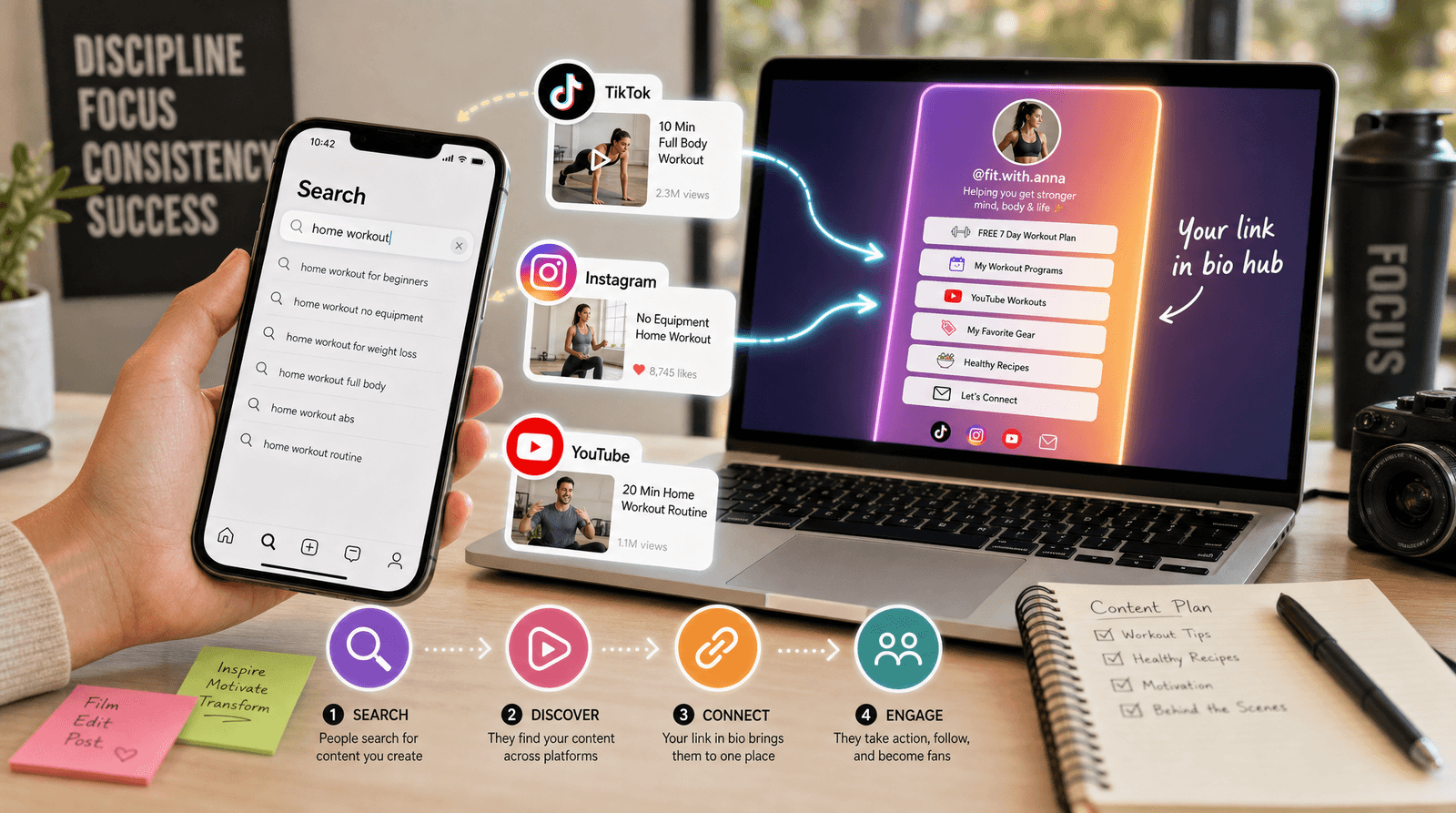
A growing share of discovery now happens inside social platforms. People open TikTok and type "best budgeting app" or "how to style oversized blazers." They search Instagram for "vegan bakery near me." They browse YouTube for "beginner guitar setup" and click through to whoever had the most helpful answer.
This shift isn't a trend piece for marketers to debate at conferences. It's a practical problem with a practical solution. If your audience is searching for what you do inside social apps, and your profiles aren't optimized for those searches, you're invisible to the exact people you want to reach. Worse, your link-in-bio page might be perfectly designed and utterly unfindable.
This guide walks through how to optimize your social profiles and your Liinks page so that social search becomes a real traffic source, not a missed opportunity.
Why Social Search Matters for Your Link-in-Bio
Traditional SEO is about Google rankings. Social search is about platform-native discovery: showing up when someone types a query into TikTok's search bar, Instagram's Explore search, or YouTube's search field.
The difference matters because these searches carry high intent. Someone searching "meal prep service for busy moms" on Instagram isn't casually scrolling. They're looking for a solution, right now, on a platform where they already spend time. If your profile appears in those results and your bio links to a well-organized Liinks page, the path from discovery to action is three taps.
Here's why this is especially relevant for link-in-bio users:
- Social search leads to profiles, not websites. When someone discovers you through a TikTok search, they land on your profile. The only clickable link on most profiles is your bio link. That makes your link-in-bio page the single conversion point for all social search traffic.
- Algorithms reward searchable content. Platforms are investing heavily in search because it keeps users in-app longer. Content optimized for search queries gets surfaced more broadly than content optimized purely for engagement.
- You're competing with fewer people. Most creators still optimize exclusively for the feed. The ones who also optimize for search have a structural advantage because the competition is thinner.
If you've already been thinking about how zero-click content drives awareness, social search is the natural next step: it's how people who saw your zero-click content later come back and find you on purpose.
Step 1: Keyword-Optimize Your Social Profiles
Social search algorithms work similarly to Google in one important way: they match queries to text. The text in your profile name, username, and bio directly affects whether you show up when someone searches.
Your Display Name Is Searchable
Most creators use just their name or brand name as their display name. That's a missed opportunity. Social platforms index your display name as a primary search signal.
Instead of just "Sarah Mitchell," try "Sarah Mitchell | Plant-Based Meal Prep." Instead of "Apex Studio," try "Apex Studio | Brand Design for Startups." The pipe or dash format keeps it clean while adding a searchable keyword phrase.
Your Bio Needs Keywords, Not Just Personality
A bio that says "Living my best life. Coffee addict. DM for collabs." is charming but unsearchable. Nobody is typing "coffee addict" into TikTok's search bar.
Rewrite your bio to include the specific phrases your ideal audience would search for. A fitness coach might write: "Strength training programs for women over 40. Free workout plans below." A photographer might write: "Wedding and elopement photographer in Colorado. Portfolio and booking below."
The free Liinks AI Bio Generator can help you draft keyword-rich bios for each platform in seconds. It generates four variations per request, so you can pick the one that balances personality with searchability.
Username Consistency Helps
If your username matches a common search term in your niche, that's a bonus. But more importantly, keep your username consistent across platforms. When someone discovers you on TikTok and then searches your exact username on Instagram, you want the same handle to appear.
Step 2: Create Content That Answers Search Queries
Feed content is designed to stop the scroll. Search content is designed to answer a question. You need both, but most creators only make the first kind.
Think in Questions, Not Topics
Instead of making a video about "morning routine," make a video titled "Morning routine for remote workers who can't focus before noon." Instead of posting about "skincare," post "How to layer serums and moisturizers for oily skin in summer."
The more specific your content title and caption, the more likely it matches a long-tail search query. Long-tail queries (three or more words) are where the real opportunity lives because they signal someone with a specific problem looking for a specific answer.
Use Keywords in Captions and Text Overlays
TikTok's search algorithm indexes your caption text, on-screen text, and even your spoken words (via auto-generated captions). Instagram indexes caption text and alt text. YouTube indexes titles, descriptions, tags, and closed captions.
This means every piece of content is a potential search result. Write captions the way you'd write a blog headline: clear, descriptive, and keyword-forward. "5 budget-friendly dinner ideas for college students" will outperform "Dinner inspo!!" in search every time.
Build Content Clusters Around Core Topics
Pick three to five core topics that define your expertise. Then create multiple pieces of content around each one, using variations of the same keywords. A personal finance creator might build clusters around "saving money in your 20s," "beginner investing," and "side hustle ideas."
This signals to the algorithm that you're an authority on those subjects. Over time, you'll start appearing in search results for related queries you didn't even target directly.
Step 3: Structure Your Link-in-Bio Page for Search Traffic
Once social search drives someone to your profile, your link-in-bio page is where the conversion happens. The page needs to deliver on whatever promise your content made.
Match Your Page to Your Search Intent
If most of your searchable content is about meal prep, the first thing visitors should see on your Liinks page is your meal prep content: a free recipe guide, your meal prep course, or your weekly menu subscription. Don't make search-driven visitors scroll past your podcast link and your merch store to find what they came for.
Use Liinks sections to organize your page by topic. Group your highest-intent offers at the top, and use clear button labels that mirror the language your audience searches for. "Free 7-Day Meal Prep Plan" converts better than "Download My Freebie" because it matches the search query that brought them there.
Use Descriptive Button Labels
Generic button text like "Click Here" or "Link" gives visitors no reason to tap. Search-driven visitors already know what they want. Use button labels that confirm they're in the right place: "Book a Free Consultation," "Download the Starter Guide," "Browse Wedding Packages."
This is the same principle behind ordering your link-in-bio buttons strategically: position and clarity determine what gets tapped.
Keep Your Page Fast and Focused
Search-driven visitors are high-intent but low-patience. They found you because they searched for something specific. If your link-in-bio page is cluttered with 15 buttons, half of which are outdated, they'll bounce.
Audit your page monthly. Remove dead links. Archive seasonal promotions. Keep your active button count between five and eight. Every button should earn its spot by serving a current, specific purpose.
Step 4: Track What's Working and Double Down
Social search optimization isn't set-and-forget. The keywords that drive traffic today might shift as trends change and competition increases. You need a feedback loop.
Monitor Platform Search Analytics
TikTok's Creator Search Insights tool shows you what your audience is searching for and which of your videos appear in search results. Instagram's Professional Dashboard shows discovery metrics, including how many people found your content through search versus the feed. YouTube Studio has a dedicated Search tab in Analytics.
Check these weekly. Look for patterns: which search terms are sending people to your content? Which videos rank for queries you didn't intentionally target? Those accidental rankings are goldmines because they reveal what your audience actually wants from you.
Use Liinks Analytics to Connect the Dots
Your Liinks analytics show you which buttons get the most clicks and when traffic spikes. Cross-reference those spikes with your content calendar. If you posted a TikTok answering "how to start a newsletter" and your "Subscribe to My Newsletter" button spiked the same day, that's a confirmed search-to-conversion pathway.
Double down on the content topics that drive link clicks, not just views. A video with 10,000 views and zero link clicks is entertainment. A video with 800 views and 50 link clicks is a sales channel.
Update Your Bio and Page Seasonally
Search behavior is seasonal. "Holiday gift ideas for her" spikes in November. "How to start a business" spikes in January. "Wedding photographer near me" spikes in spring.
Update your display name keywords, your bio text, and your Liinks page button order to match what your audience is searching for right now. A photographer might lead with "Now Booking Fall 2026 Sessions" in summer and switch to "Holiday Mini Sessions Available" in October.
The Social Search Checklist
Here's a quick-reference list you can run through today:
- Display name includes a searchable keyword phrase (not just your name)
- Bio text contains two to three specific phrases your audience would search for
- Username is consistent across all platforms
- Recent content answers specific questions, not just generic topics
- Captions use descriptive, keyword-forward language
- Content clusters exist around three to five core topics
- Link-in-bio page leads with your highest-intent offer
- Button labels are specific and descriptive, not generic
- Page is focused with five to eight active buttons, no dead links
- Analytics are checked weekly to identify which search terms drive traffic
TL;DR
Social search is replacing Google as the primary discovery engine for a growing segment of the internet. People are searching TikTok, Instagram, and YouTube for the exact things you offer. If your profiles aren't keyword-optimized and your link-in-bio page isn't structured to convert search-driven visitors, you're leaving the highest-intent traffic on the table. Optimize your display name, write searchable bios, create content that answers specific queries, and make sure your Liinks page delivers exactly what searchers came to find.
Ready to Capture Social Search Traffic?
Your link-in-bio page is the single conversion point for every person who discovers you through social search. Liinks gives you customizable sections, descriptive buttons, and built-in analytics so you can build a page that turns search-driven visitors into subscribers, customers, and fans. Set up your free page in under two minutes and start converting the traffic you're already earning.