How Authors Can Use a Link-in-Bio to Turn Readers Into Buyers (and Keep Them)

Here is the most expensive sentence in publishing: "Link in bio."
You write it under a launch-day post, a glowing review, a cover reveal. A reader sees it, feels the spark of "I want this," and taps. Then they land on a page that sends them to one store, or to a generic profile, or to a homepage that buries the actual book under three menus. The spark fades. They put the phone down. You will never know it happened, but you lost a sale you had already earned.
Selling books was never the hard part of being an author. Getting the interested reader from "I saw your post" to "I bought it, and I will buy the next one" is the hard part. That short journey runs straight through your link in bio, and most authors treat it as an afterthought.
This guide fixes that. We will build an author page step by step: one clean link that meets readers at whatever store they prefer, captures their email so a single book becomes a long relationship, and quietly tells you what is working. You do not need a website or a publicist. You need about thirty minutes and a clear plan.
Why authors need a link hub more than almost anyone
Most creators link to one thing: a video, a shop, a Substack. Authors have a uniquely scattered problem. A single title lives on Amazon, Apple Books, Kobo, Google Play, Barnes & Noble, Bookshop.org, your local indie's site, maybe an audiobook on Audible, and possibly a signed-copy option you sell direct. That is not one link. That is a decision tree.
When you drop a lone Amazon link in your bio, you are politely telling every reader who prefers another store, or who likes to support independent bookshops, that you did not think about them. Some will hunt down their preferred option anyway. Most will not. Friction is the quiet killer of book sales, and every extra tap between desire and checkout is a place readers fall off.
A link-in-bio hub collapses that decision tree into one tidy page. The reader taps once, sees their store of choice, and buys in the format they want. This is the core idea behind a good link-in-bio setup, and it is why tools like Liinks exist: instead of routing your hardest-won attention to a single retailer you do not control, you route it to a page you do.
There is a second, bigger reason authors specifically need this. Books are slow. A reader who loves your debut might wait two years for the next one. If the only thing your bio link did was sell a single copy, you let the most valuable asset in publishing walk out the door: a reader who already likes your writing. A hub lets you sell the book and keep the reader. That second part is what turns a one-time author into a career.
Step 1: Claim your page and make it unmistakably yours
Start by claiming a clean, memorable URL. Your author name is ideal: liinks.co/yourname. It is easy to say on a podcast, print on a bookmark, or read aloud at an event, and it works across every platform instead of forcing readers to find your handle on the right app.
Then make the page look like it belongs to you, not to a template. Authors live and die by mood. A cozy mystery, a literary memoir, and a hard sci-fi trilogy should not share the same generic page. With Liinks you can match your colors, fonts, and background to your book's cover or your author brand, so the page feels like an extension of the world you write in. Add a clear profile photo or a clean logo, a one-line bio that says who you are and what you write ("I write small-town romance with big feelings"), and you have set the tone before a reader scrolls an inch.
This matters more for authors than for most creators because readers are buying you as much as the book. A page that feels considered signals a writer who is in it for the long haul.
Step 2: Lead with the book you most want to sell
The order of everything on your page is not decorative, it is strategic. People tap the top of a page far more than the bottom, so the first thing a reader sees should be the single action you most want them to take. We break down that logic in How to Order Your Link-in-Bio Buttons, and it applies double for authors, where you usually have one book you are actively pushing.
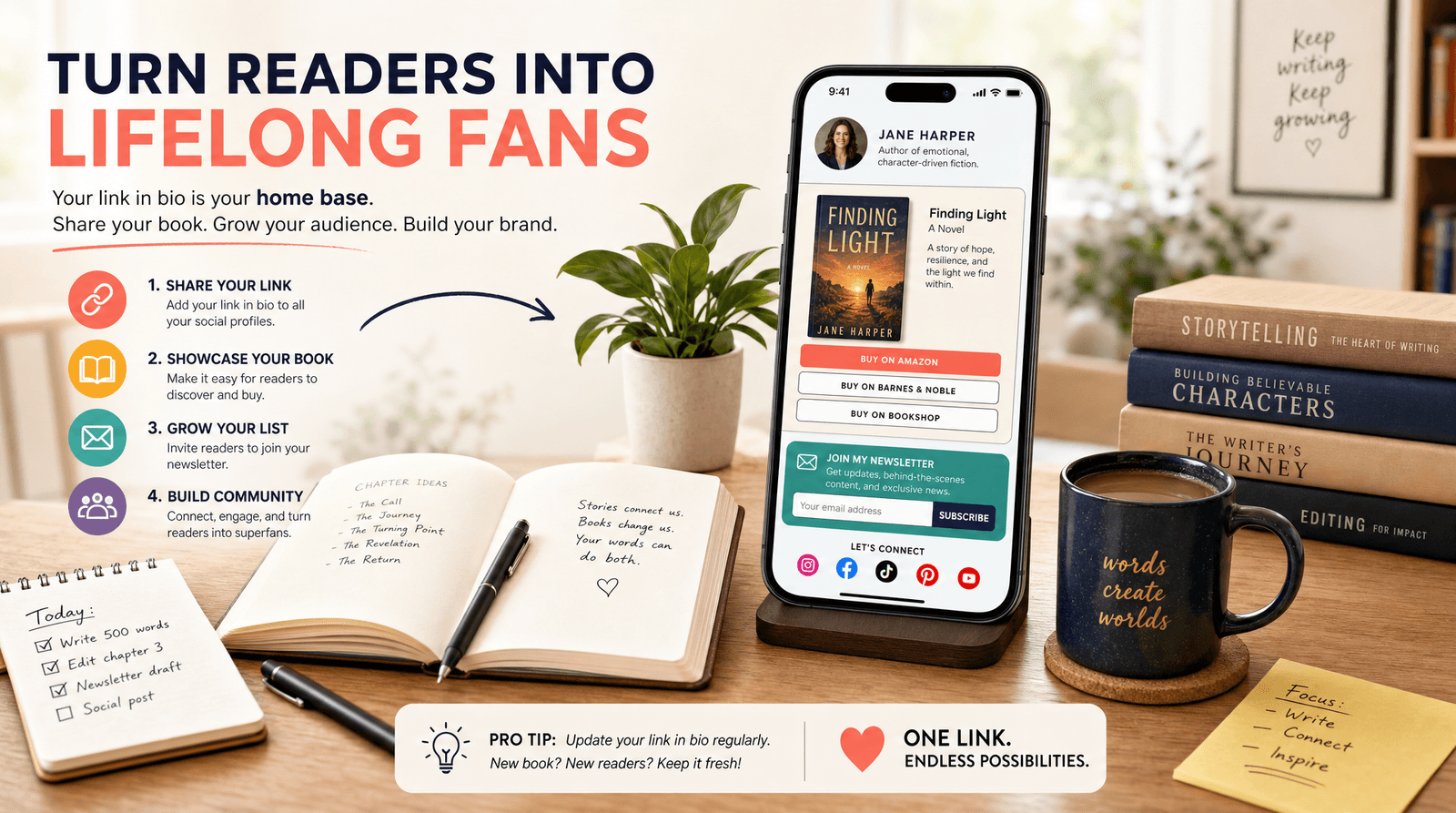
In practice that means a featured block at the very top for your current release or preorder: the cover image, the title, and one obvious "Get the book" button. Do not make readers scroll past your entire backlist to find the thing your latest post was about. If you are running a launch or a preorder campaign, this top slot is your campaign headquarters, and you can swap it out the moment the next book is ready.
A preorder deserves special emphasis. Preorders drive first-week rankings, which drive visibility, which drives more sales. If you have a book coming, the top of your page should scream it, with a countdown framing in your bio copy ("Out June 30, preorder now") to give readers a reason to act today instead of "later" (which means never).
Step 3: Add every store, neatly grouped
Below your featured book, give readers their choice of store without making the page feel like a spreadsheet. The trick is grouping.
Create a clean section of buy buttons for the featured title: Amazon, Apple Books, Kobo, Barnes & Noble, Bookshop.org, and a direct "Signed copies" link if you sell them. If you have an audiobook, label it clearly, because audio buyers know exactly what they want and will scan for it. With Liinks you can use sections and headers to keep this tidy, so "Read it" and "Listen to it" are visually distinct instead of one long undifferentiated list.
Then add your backlist below, ideally grouped by series or genre so a new reader who just finished your latest can fall straight into the next one. This is the single most underused move in author marketing: the moment someone finishes your book is the moment they are most likely to buy another, and your link in bio should make "what do I read next" a one-tap answer.
A few practical notes:
- Use real cover thumbnails where you can. Covers sell books; plain text buttons do not.
- Lead each store row with the retailer readers actually use, but include the indie options. The goodwill from "they linked Bookshop" is real and cheap to earn.
- Keep direct sales obvious if you do them. Selling signed or direct copies earns you the highest margin and the reader's email, so do not bury it.
If part of your goal is selling more than just the book, the same logic that turns a content page into a storefront applies here. We walked through building a lightweight shop in Make Every Post Shoppable, and the structure works just as well for merch, workbooks, or a course built around your writing.
Step 4: Capture the reader before they leave
This is the step that separates authors with careers from authors with a single good launch. A book sale is a transaction. An email address is a relationship.
When someone lands on your page because they liked a post, they are warmer than they will ever be again. If they buy, wonderful, but you still have no way to reach them when book two arrives. The fix is to put an email signup right on your page, framed as a benefit and not a chore. "Get a free short story" or "Be first to know when the next book drops" converts far better than "Subscribe to my newsletter."
A reader list is the only marketing channel an author truly owns. Algorithms decide who sees your posts; your list reaches everyone who asked to hear from you, every time, on launch day. We made the full case for treating email as the destination, not the afterthought, in Newsletter Growth on Autopilot, and for authors it is not optional. The entire economics of a writing career improve when you can email a few thousand readers and say "it is out."
Put the signup high enough that it does not get lost, but below your featured book so you are not asking for an email before you have offered any value. A reader magnet, a deleted scene, a character's recipe, the first chapter, gives people a reason to hand over their address today.
Step 5: Watch what readers actually do, then adjust
You do not need a marketing degree to run an author page well. You need to glance at a few numbers once a week and respond to what they tell you.
With built-in analytics on your Liinks page, you can see which buttons readers tap. That is genuinely useful intelligence. If everyone clicks Amazon and nobody touches Apple Books, you can reorder. If your audiobook link outperforms everything, your next campaign should lean into audio. If the email signup gets plenty of views but few clicks, your reader magnet needs a better hook.
The other half of tracking is knowing where your readers come from. If you promote your book on Instagram, in a newsletter swap, and as a podcast guest, you will want to know which of those actually sends people who buy. Tagging those links tells you, so you can stop guessing and spend your limited promo energy on the channels that move books.
Check it weekly, change one thing, and watch the next week. Small, steady tuning beats a perfect page you set up once and never touch.
TL;DR
- Your book is sold in a dozen places. Your bio gets one link. A link-in-bio hub closes that gap so readers buy in the store and format they prefer, with no extra friction.
- Lead with the book you want to sell most. The top of the page gets the taps, so feature your current release or preorder with a cover and one clear button.
- Group every store cleanly, then put your backlist below, organized by series so finishing one book leads straight to the next.
- Capture the email. A sale is a transaction; a reader list is a career. Offer a reader magnet and make signing up a benefit, not a chore.
- Check your analytics weekly and adjust one thing at a time based on what readers actually tap.
Build your author page on Liinks
You already do the hard part: you write the book. The link between a reader's interest and their wallet should not be the thing that costs you sales. A clean, considered author page turns a scattered list of stores into one easy yes, and turns a single reader into a subscriber who buys everything you publish next.
You can build the whole thing in an afternoon. Start your page on Liinks, point your bio link at it, and give your readers one place that finally makes sense. Your next launch will thank you.